Citadel, on your own computer WELD stack
Parity
Run Citadel on your own computer.
Citadel's own PHP image, Citadel's proxy and MySQL 5.6, running on your laptop. An app that works here works on Citadel, so "works on my machine" finally means something: your machine is Citadel's twin.
One program for Windows, macOS and Linux. It needs a container engine (Podman or Docker) and one parity.json in your app. No PHP, no Composer, nothing else installed.
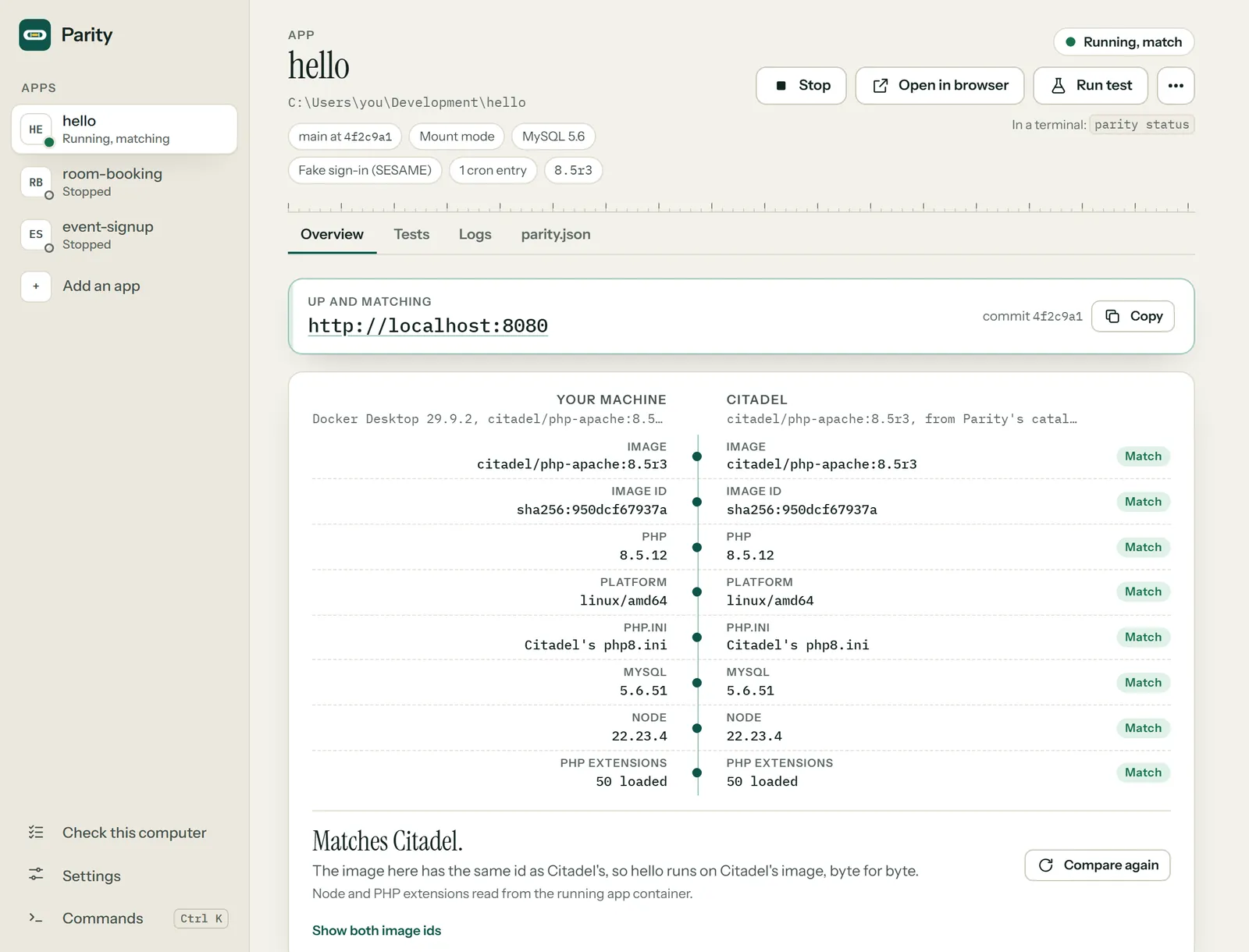
Matches Citadel. All 6 rows match. Up at http://localhost:8080
testdata/hello on Citadel's own image. The image id is the proof: same id, same bytes.- 1 program,
parity, with no PHP to install - 6 builds: Windows, macOS and Linux, each on x64 and arm64
- 5.6.51 the MySQL Citadel's shared server runs
- 0 secrets in
parity.json, ever
Side by side
Your machine, and Citadel, in the mirror.
Parity reads both sides the same way and lines up the facts. Citadel's image is checked by its sha256 and its image id against a catalog inside Parity, so "Match" means the same bytes, not the same label. Switch to your own build of the same tag to see the mirror crack: the same label, other bytes, and Parity says so.
Matches Citadel. All 11 rows match.
An image can wear Citadel's tag and still not be Citadel's. Built from the same files on another day, it picks up a newer PHP patch and an image id of its own, so Parity calls it "not the build Citadel runs", and parity image get swaps in Citadel's own. Parity runs Citadel's images and nothing else.
A day with Parity
Check, then up.
Run these in your app's folder. Every printout below is real, from a Windows PC with Docker Desktop and the testdata/hello app in Parity's repository. In a pipe or a CI log the symbols turn into plain [ OK ] tags. Exit codes match PROCTOR's and Squire's: 0 pass, 1 findings or a failed test, 2 cannot run.
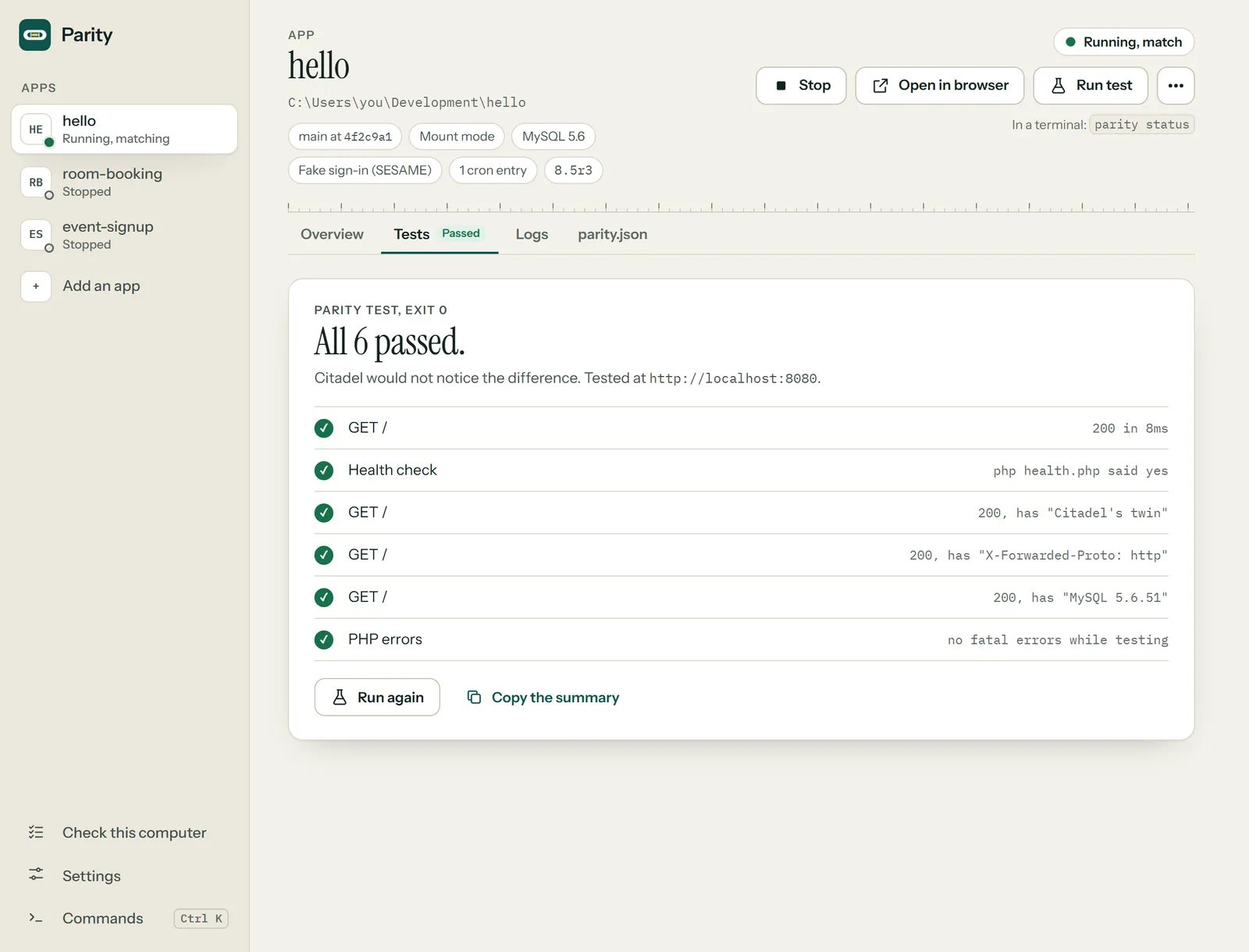
Terminal or app, same Parity: the app's buttons call the same Go code these commands run, so the two cannot disagree. The app is not out yet; its screens are from the work in progress, with sample apps.
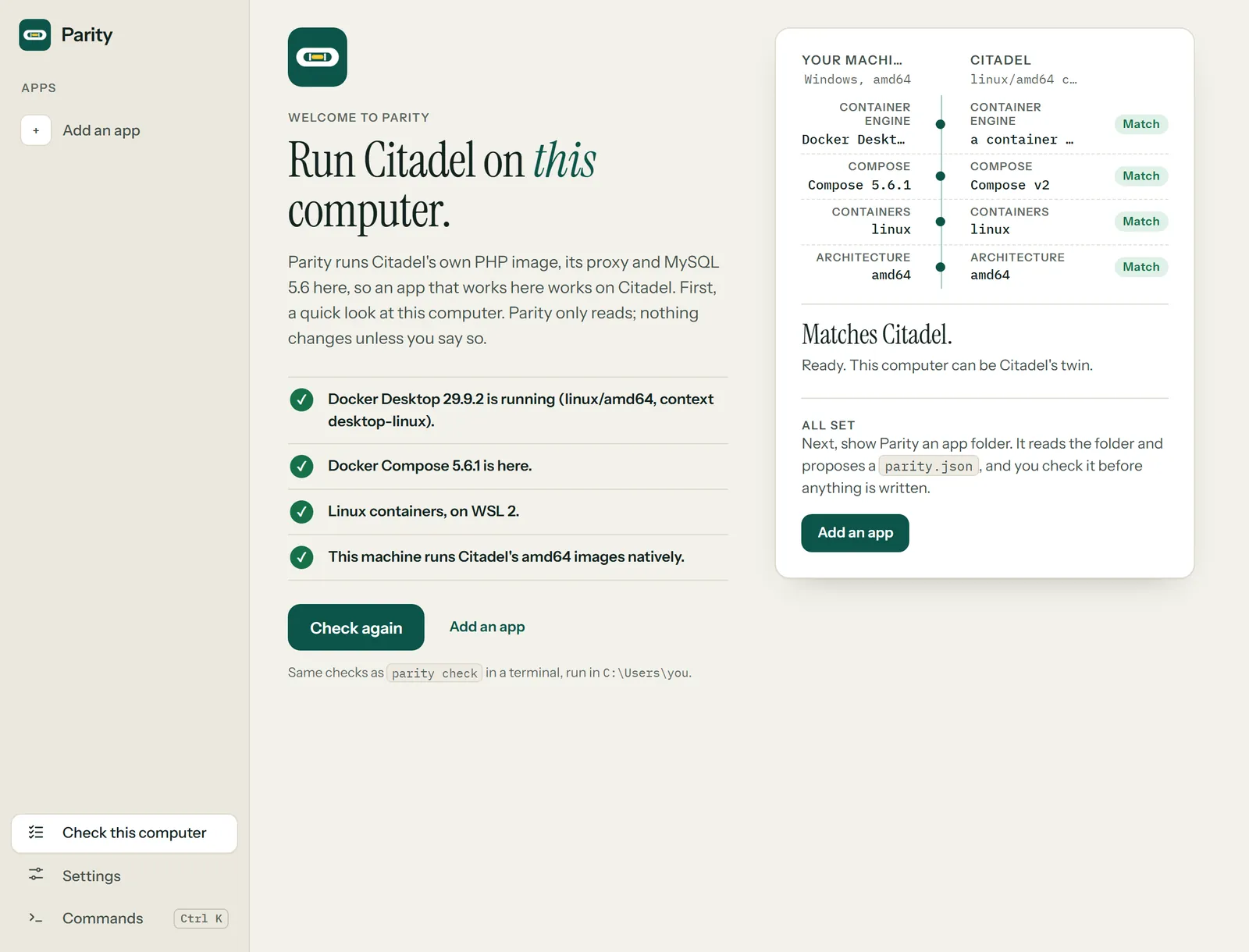
> parity check

  Parity check  C:\Users\you\Development\my-app

  ✓ Docker Desktop 29.9.2 is running (linux/amd64, context desktop-linux).
  ✓ Docker Compose 5.6.1 is here.
  ✓ Linux containers, on WSL 2.
  ✓ This machine runs Citadel's amd64 images natively.

  Ready. This computer can be Citadel's twin.
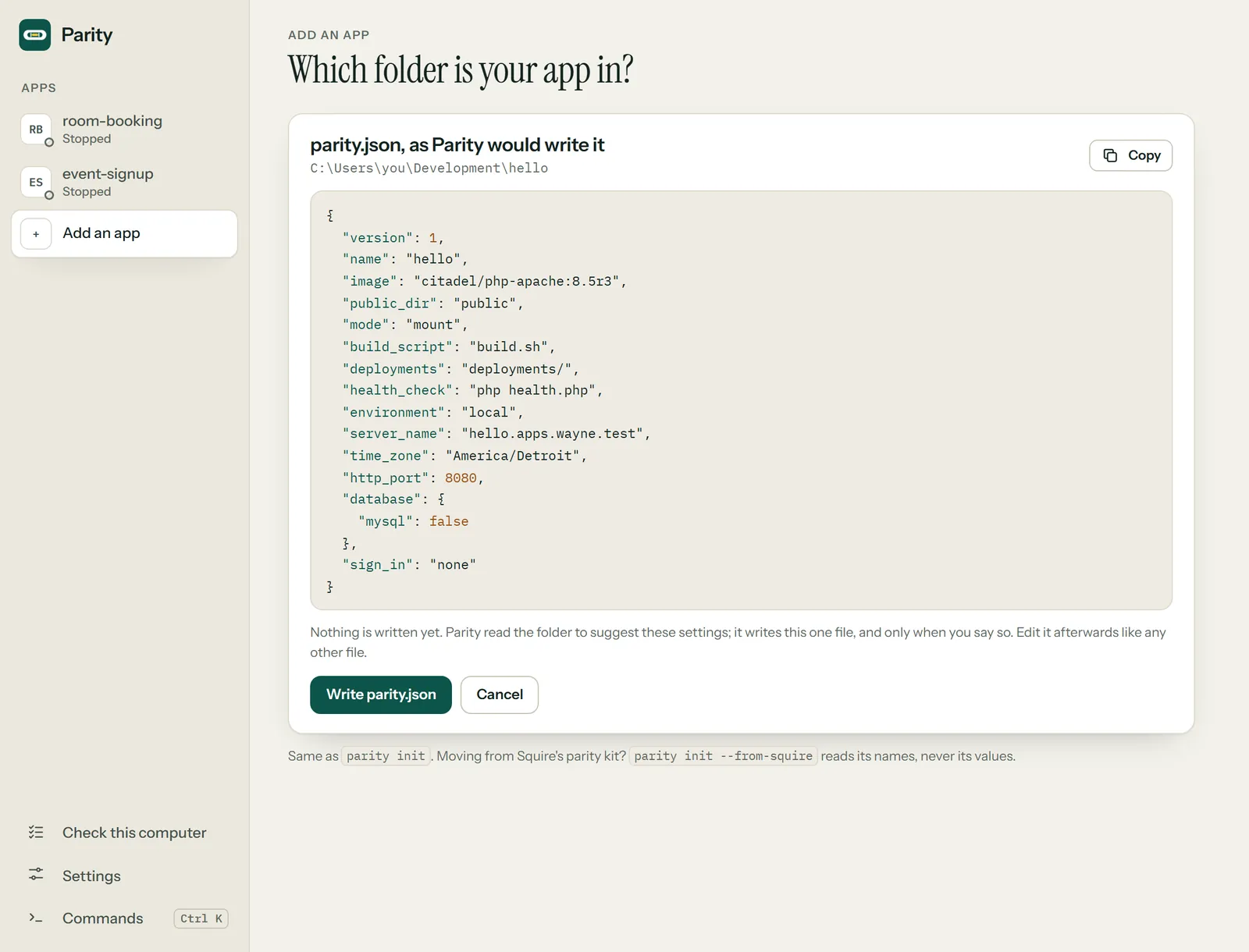
> parity init --print
{
  "version": 1,
  "name": "hello",
  "image": "citadel/php-apache:8.5r3",
  "public_dir": "public",
  "mode": "mount",
  "build_script": "build.sh",
  "deployments": "deployments/",
  "health_check": "php health.php",
  "environment": "local",
  "server_name": "hello.apps.wayne.test",
  "time_zone": "America/Detroit",
  "http_port": 8080,
  "database": {
    "mysql": false
  },
  "sign_in": "none"
}
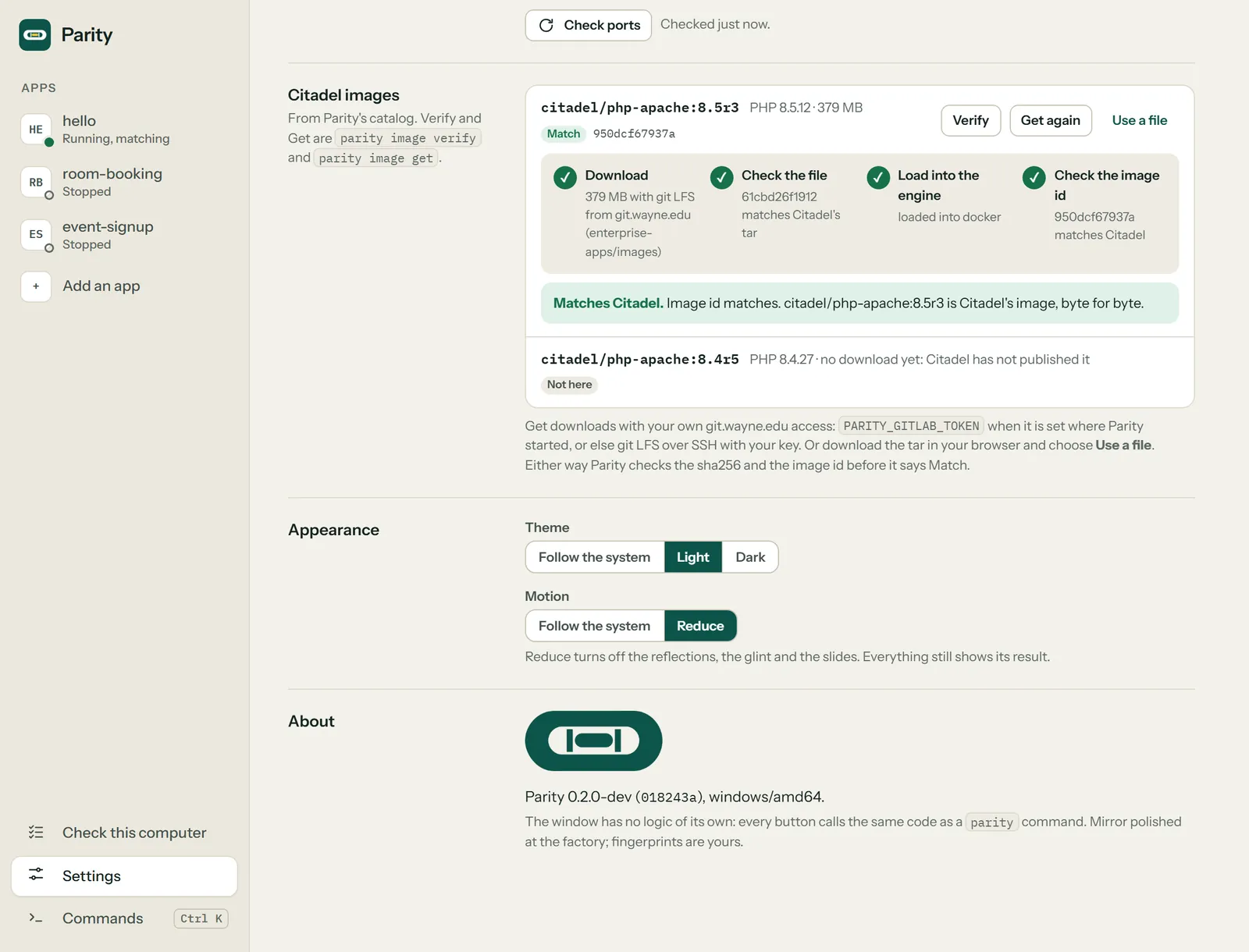
> parity image get

  Parity image get  citadel/php-apache:8.5r3

  ✓ Fetch  379 MB with git LFS from git.wayne.edu (enterprise-apps/images) 30s
  ✓ sha256 61cbd26f1912 matches Citadel's tar
  ✓ Load   loaded into docker 28s
  ✓ Id     950dcf67937a matches Citadel

  citadel/php-apache:8.5r3 is Citadel's own, byte for byte. Next: parity up
> parity up

  Parity up  hello on citadel/php-apache:8.5r3

  ✓ Image  citadel/php-apache:8.5r3 matches Citadel (950dcf67937a)
  ✓ Build  app image built; build.sh ran as root with /bin/sh 4s
  ✓ MySQL  5.6.51 is ready on 127.0.0.1:3307, database hello 10s
  ✓ App    deployments ran, and healthy: php health.php said yes 4s
  ✓ Proxy  HAProxy answers, adding X-Forwarded-For and X-Forwarded-Proto as Citadel's does

  hello is up at http://localhost:8080
  Citadel's twin is awake. Edits in this folder show on the next request.
> parity test

  Parity test  hello at http://localhost:8080

  ✓ GET /          200 in 8ms
  ✓ Health check   php health.php said yes
  ✓ GET /          200, has "Citadel's twin"
  ✓ GET /          200, has "X-Forwarded-Proto: http"
  ✓ GET /          200, has "MySQL 5.6.51"
  ✓ PHP errors     no fatal errors while testing

  All 6 passed. Citadel would not notice the difference.
> parity help
Parity: run Citadel on your own computer.

Usage: parity [-C folder] <command> [options] [--plain]

Commands:
  check    tell you what to fix before Parity can run Citadel here, one finding per line
  init     write parity.json, the app's Citadel settings (--from-squire reads a Squire kit)
  up       run the app the way Citadel runs it, behind the proxy
  status   show how the app, MySQL and the proxy are doing
  image    list, get or verify Citadel's images (get downloads one and checks it is Citadel's)
  logs     show the app's output (-f follows; --apache shows Apache's own logs; deployments shows the deployment scripts' logs)
  test     smoke test the running app through the proxy (plus the requests in parity.json)
  shell    open a shell in the app container
  down     stop the app (the database stays; --volumes empties it)
  engine   show or save which container engine Parity uses (podman, docker or auto)
  version  print Parity's version

Exit codes: 0 pass, 1 findings or a failed test, 2 cannot run.
Run `parity <command> --help` for a command's options.
parity twin. Full size: the command list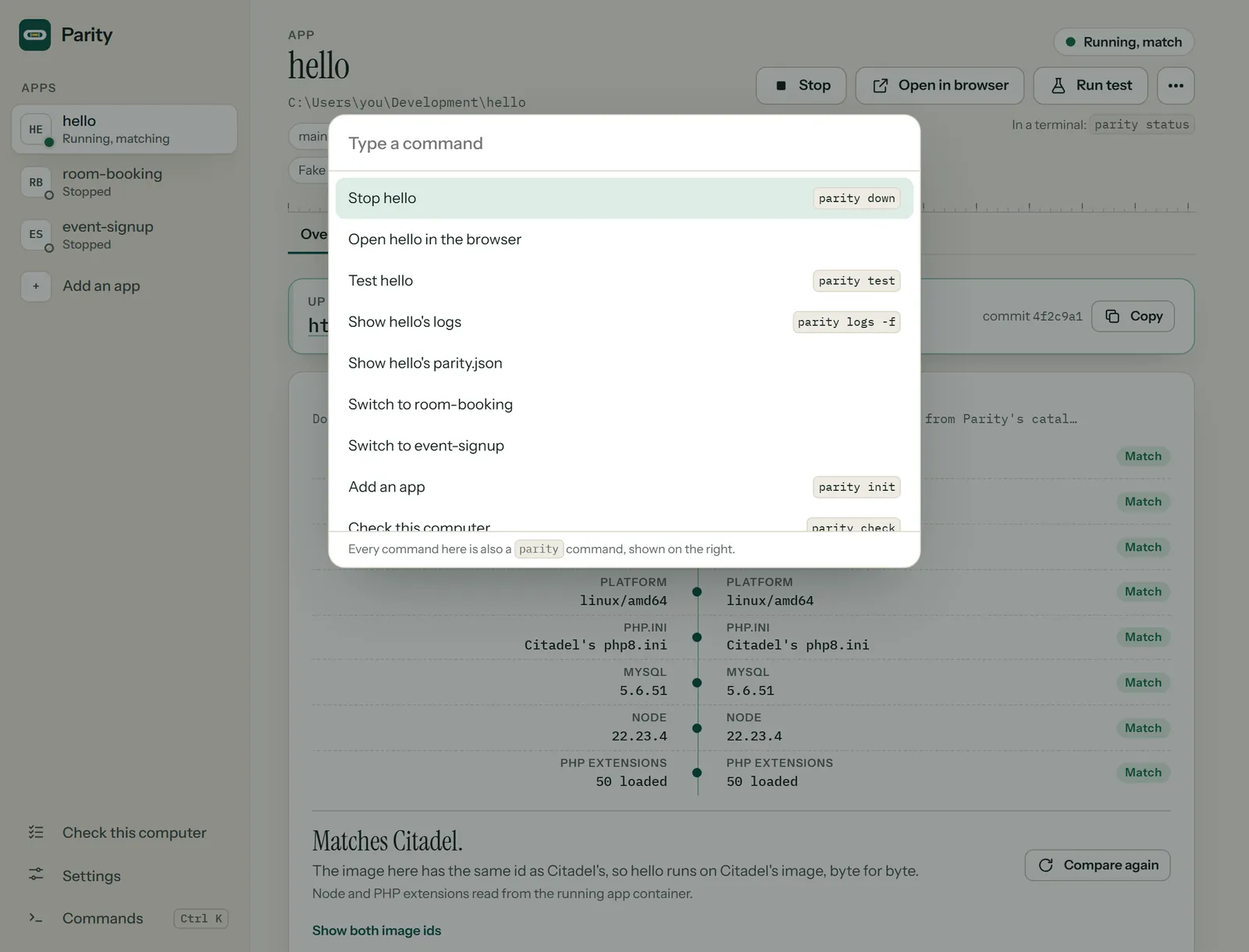
No Citadel image yet?
Parity runs Citadel's own image and nothing else. If Citadel has not published a download for your app's image yet, Parity says so: pick an image it can get, or ask the Citadel team to publish it. More on images.
Mount or bake
In mount mode your folder is mounted at /citadel/src, as Citadel mounts it: edit, reload. In bake mode the code is copied into the image, so a tester tests one exact commit, and Parity says which.
Done for the day
parity down stops it. Your local database stays until you add --volumes. Everything Parity writes lives in .parity/, which ignores itself in git.
Get Parity
One line per computer.
On Windows the install line puts parity on your PATH. On macOS and Linux it goes in ~/.local/bin, and if that folder is not on your PATH yet, the script prints the one line to add (it never edits your shell profile). Then open a new terminal and run parity check; it says what, if anything, to fix first.
In PowerShell:
irm https://parity.apps.wayne.edu/install.ps1 | iexNeeds a container engine on WSL 2: Podman Desktop (recommended, free), or Docker Desktop if you already have it. Podman Desktop: winget install --id RedHat.Podman-Desktop -e. Windows on Arm runs Citadel's amd64 images under QEMU emulation, which is slow but real.
In Terminal:
curl -fsSL https://parity.apps.wayne.edu/install.sh | shNeeds a container engine: Podman Desktop (recommended, free), or Docker Desktop if you already have it. Podman Desktop: brew install --cask podman-desktop. On Apple Silicon, Citadel's amd64 images run emulated; parity check says what your engine needs.
In a shell:
curl -fsSL https://parity.apps.wayne.edu/install.sh | shNeeds a container engine: Podman (recommended, free, from your distribution's package), or Docker Engine with its Compose plugin if you already have it. On arm64, install QEMU's amd64 emulation once; parity check prints the line.
Or take the file yourself
Each archive holds one program, parity (parity.exe on Windows), with its README, license and changelog. Check it against checksums.txt. 0.1.0 ships unsigned, and so will 1.0; signed binaries come before the desktop app, which follows 1.0.
| Computer | x64 (Intel, AMD) | arm64 |
|---|---|---|
| Windows | parity_windows_amd64.zip | parity_windows_arm64.zip |
| macOS | parity_darwin_amd64.tar.gz | parity_darwin_arm64.tar.gz |
| Linux | parity_linux_amd64.tar.gz | parity_linux_arm64.tar.gz |
Moving over
Coming from Squire's parity kit?
Parity grew up inside Squire as squire init --only=parity. It moved out because people want to run Citadel locally without the rest of the deploy kit. In the folder with docker-compose.squire.yml:
parity init --from-squireIt carries the kit's settings over (base image, public folder, ports, database name, time zone, deployments) and leaves every password behind by name: Parity makes its own local ones. It lists the kit's files and deletes none of them. Two differences to expect: Parity runs Citadel's own php.ini, not the kit's hardened one, because that is what Citadel runs; and the kit's scheduler and worker services become one cron entry, because Citadel has cron and no services. The whole move
Plainly
What Parity will not do.
Run a look-alike
Parity runs Citadel's own images only. "Matches Citadel" needs the tar's sha256 and the loaded image's id to match the catalog; an image with Citadel's tag and other bytes never gets that line, however close it is.
Print a configuration value
Configuration files are checked for their required keys by name. Values are never printed and never baked into an image.
parity.jsonholds settings, never secrets.Bring real data home
Parity ships no data, no connectors and no credentials. A local copy may point only at a test database its data owner approves, never production, and never real student or employee data on a laptop (FERPA).
Hide the rough edges
Citadel runs MySQL 5.6: no JSON columns, and indexed strings stop at 191 characters. Parity runs the same, so you meet those limits here first.
For your coding agent
Hand it to your agent.
Two prompts for whatever coding agent you use: one to get an app running on Parity, one to move an app off Squire's parity kit. Copy one, or open it in your tool. Each starts with parity check, which changes nothing.
Any PHP app that runs on Citadel
Get started with Parity
Checks the computer, writes parity.json, brings the app up on Citadel's image and smoke tests it. It asks before changing anything outside the app.
You are a coding agent helping me run the PHP app in this folder on Parity, at Wayne State University. Parity runs Citadel (the university's PHP hosting platform) on this computer: Citadel's own Apache and PHP image, its proxy headers and MySQL 5.6, driven by one program, parity, and one settings file, parity.json. It is part of WELD, the Wayne State application stack.

Read first:
- https://parity.apps.wayne.edu/llms.txt, the index of Parity's pages, each one as Markdown; llms-full.txt beside it holds the README and every page. Fetch what you need; do not work from memory.
- ADVISOR, the stack's MCP server, if it is connected: read_project_docs for parity, and list_stack_rules for this app's shape. If it is not connected, say so and work from the pages. How to add it: https://advisor.apps.wayne.edu/llms.txt
- This app's composer.json, .env.example and any build.sh, deployments/ or health check it has.

Task:
1. If parity is not installed, install it with the line for this computer from https://parity.apps.wayne.edu/#install and open a new terminal.
2. Run parity check and report each finding with its fix. Do not apply a fix that changes this computer (an engine setting, git config) until I say so.
3. Run parity init --print and show me the parity.json it would write. Say which values it guessed and why. Write it with parity init once I agree.
4. Run parity image list. If Citadel's image is not here, run parity image get; if parity says Citadel has not published a download for the app's image yet, stop and tell me; do not swap in another image.
5. Run parity up, then parity test, and report the address and every result.

Constraints:
- Fake data only. Never point the app at a production database or copy real student or employee data to this computer (FERPA).
- Never print, copy or commit a configuration value or password; parity.json holds settings, never secrets.
- Never call an image Citadel's unless parity says it matches Citadel. Never commit or push.
- Ask me before you guess: a PHP version the app does not state, a missing configuration file, or a port that is taken.

Output: the check findings, the parity.json, the up and test printouts, then your questions.An app with Squire's parity kit
Move from Squire's parity kit
Carries the kit's settings into parity.json, proves the app comes up on Parity, and leaves the kit's files for you to remove.
You are a coding agent moving the app in this folder from Squire's parity kit (docker-compose.squire.yml, .squire/, scripts/parity.sh and scripts/parity.ps1) to Parity, at Wayne State University. Parity is the stack's own way to run Citadel locally; it grew out of the kit.

Read first:
- https://parity.apps.wayne.edu/llms.txt, then the docs page Coming from Squire's parity kit, which it lists.
- ADVISOR, the stack's MCP server, if it is connected: read_project_docs for parity and squire. If it is not connected, say so and work from the pages.

Task:
1. Run parity check and report what it finds.
2. In the folder with docker-compose.squire.yml, run parity init --from-squire --print and show me the parity.json it would write, and the kit files it lists. Then write it with parity init --from-squire.
3. Run parity up, then parity test, and compare the result with what the kit gave: say what differs (Parity runs Citadel's own php.ini, not the kit's hardened one).
4. List the kit's files I could remove once I am happy, and what in the README or CI still points at them. Remove nothing yourself.

Constraints:
- Passwords stay behind: Parity makes its own local ones. Never copy a value from .env.squire into parity.json or anywhere else.
- Keep Squire's release files (build.sh, deployments/, scripts/release.sh, health.php): Citadel still needs them. Only the parity kit is replaced.
- Never commit or push. Ask me before you guess.

Output: the check findings, the parity.json, the up and test printouts, the list of kit files, then your questions.
The agent reads the same pages you do: llms.txt lists them, llms-full.txt holds them all in one file, and this page has a Markdown twin. Nothing here phones home. The buttons only copy text or open the tool you picked.
Where it fits
Parity's place in WELD.
WELD is the Wayne State application stack. Parity is its "run Citadel locally" layer. It depends on nothing else in the stack, so any Citadel app can use it, stack or not.
 WayneUIThe interface layer every app renders, this page included.
 CREEDThe version policy.
 PROCTORMeasures an app against that policy.
 PreflightThe CI templates; this site's accessibility gate is one of them.
 SESAMESign-in. Its fake driver is how a local copy signs in without CAS.
 HELMETThe baseline runtime: headers, sessions,
/up. PinstripeThe coding standard.
 SourdoughThe starters. Every app ships a Squire kit, which
parity initreads. BoosterMoves apps forward. A PHP upgrade is exactly when Citadel's real image matters.
 SquireGets the app onto Citadel. Parity runs Squire's
build.shanddeployments/the way Citadel does. ParityCitadel on your computer.You are here
 RollcallEvery app answers "present", with its PHP version.
 ADVISORAn MCP server your agent can ask about the stack.
 DrawbridgeThe sign-in gateway.
 WELDThe stack's name, and its Laravel and Vue starter.
Next
The road to 1.0.
The command line does the whole job today, and 1.0 is these same commands, promised. What stands between here and the tag is proof: parity up and parity test on real computers, with Citadel's own image, each engine in turn.
- Linux Podman, rootful and rootlessProven
- Windows Podman Desktop, mount and bakeProven
- Windows Docker DesktopProven
- macOS Apple Silicon, Podman and Docker DesktopNext
- 1.0 Today's commands, as a promise:
check,init,up,down,status,logs,shell,test,trust,imageandengine, and local HTTPS on 127.0.0.1:8443 from a name-constrained certificate authority of your own, so an app that forces HTTPS (or signs in with CAS) is tested as it is. Unsigned, with checksums, like 0.1.0. - After 1.0 A desktop app for people who never open a terminal: the same commands as buttons, and the same mirror reading "Matches Citadel." Signed binaries for Windows and macOS come first. See its screens beside the commands.
- Later
reset,eject,image pinandimage build; winget, Homebrew and deb or rpm packages.